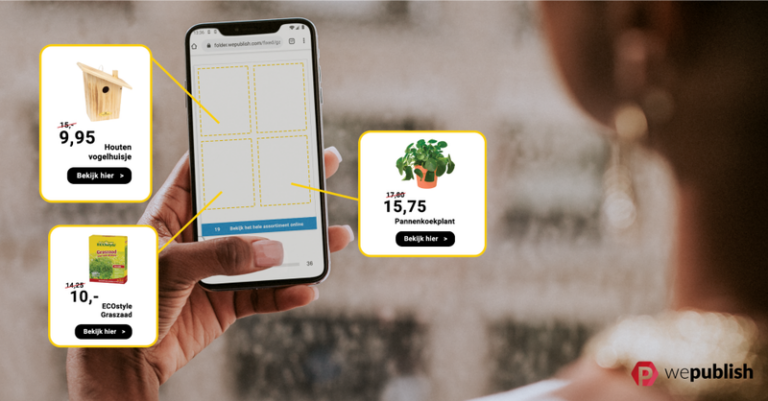
If you’re still thinking of a catalog as a printed booklet, it’s time for an update. Today’s catalogs are digital, interactive, and built to work as hard as your best salesperson, letting shoppers browse, click, and buy directly from the pages. Whether you’re putting together a seasonal product catalog, a lookbook, or a full B2B line sheet, the process is more approachable than it looks.
Here’s how to create a catalog that actually converts, from first draft to publish.
1. Define the goal of your catalog
Before you open a design tool, get clear on what this catalog needs to do. A catalog built to drive online sales looks different from one meant to support an in-store visit or hand off to a sales rep. Ask yourself:
- Is this catalog primarily for browsing, or do you want direct “add to cart” functionality?
- Will it be viewed on mobile, desktop, or both?
- Does it need to reflect real-time pricing and stock, or is it more seasonal and static?
This decision shapes everything downstream — layout, product data, and which platform you use to build it.
2. Gather and organize your product data
A catalog is only as good as the information behind it. Pull together:
- Product names, SKUs, and descriptions
- High-resolution images (consistent lighting and background go a long way here)
- Pricing, and any variants like size or color
- Categories or sections you want to group products into
If you’re managing hundreds or thousands of SKUs, this is also the point where a catalog management platform earns its keep — rather than manually re-entering data every time you update pricing, you can pull directly from your existing product feed.
3. Choose a layout that matches how people will read it
Print habits don’t automatically translate to digital. On a screen, readers scan rather than read cover to cover, so:
- Lead each spread with your strongest visual, not your longest copy block
- Keep grids consistent so the catalog feels navigable, not chaotic
- Leave breathing room — dense pages feel harder to shop, even if the products are great
- Group similar or complementary products together to encourage cross-browsing
If you’re short on inspiration, it’s worth looking at a range of catalog design examples across different industries before locking in your own layout.
4. Make it interactive, not just readable
This is the step that separates a digital catalog from a PDF with a nicer cover. A modern catalog should let shoppers:
- Click directly on a product to see pricing, variants, and an add-to-cart button
- Zoom into images without losing quality
- Jump to a specific category or search within the catalog
- Share individual pages or products via link
This is where a digital catalog creator like WePublish comes in — you can upload an existing PDF or design file and layer in shoppable hotspots, search, and analytics, without rebuilding the catalog from scratch or hiring a developer.
5. Optimize for mobile from the start
A large share of catalog traffic now comes from phones. Test your layout at mobile width before you finalize it — not after. Text that’s readable on a 27-inch monitor can be unusable on a 6-inch screen. Platforms built specifically for digital catalogs handle this responsiveness automatically, which is one less thing to manually QA across devices.
6. Publish and distribute
Once your catalog is built, decide where it lives:
- Embedded on your website or a dedicated landing page
- Linked in email campaigns
- Shared across social and affiliate channels
- QR-coded on printed materials for a print-to-digital bridge
If sustainability matters to your business (and increasingly, to regulators — several EU countries now restrict unsolicited print catalogs), a digital-first distribution strategy also reduces your paper footprint without sacrificing reach.
7. Track what’s actually working
The advantage of a digital catalog over print is that you can measure it. Look at:
- Which pages get the most engagement
- Click-through rate on products
- Time spent per session
- Conversion from catalog view to purchase or lead
This data should feed back into your next catalog — cutting the pages that don’t perform and doubling down on the ones that do.
Building your first catalog
You don’t need design or development experience to publish a professional, interactive catalog. Tools like WePublish let you start with a 14-day free trial, upload your existing designs, and add shoppable features without any code — whether you’re publishing your first seasonal flyer or managing an ongoing catalog program.
Ready to build yours? Try our catalog creator free for 14 days